
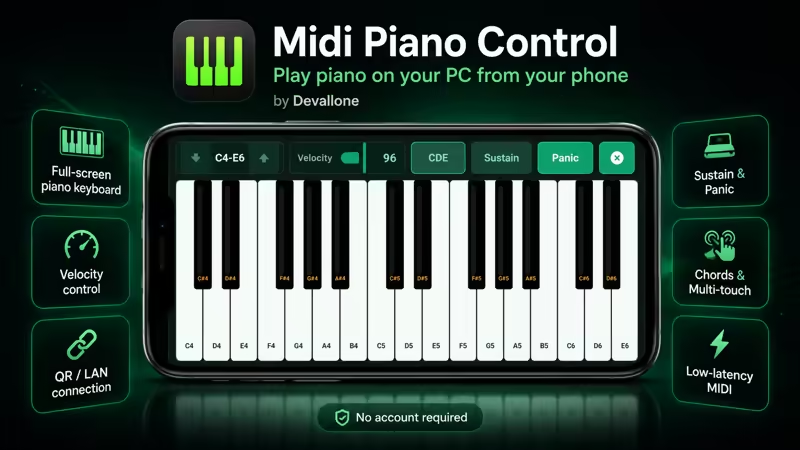
Midi Piano Control turns your Android phone into a full-screen piano-style MIDI controller for your Windows PC.
Designed for musicians, producers, beatmakers, students, and creators, Midi Piano Control lets you play piano notes from your Android phone and send them to your Windows music workflow through the Midi Piano Control Windows server.
Connect your phone and PC over the same local Wi-Fi/LAN network using QR code pairing, local network discovery, or manual connection. Once connected, your phone becomes a clean full-screen touch piano keyboard ready for music creation, testing melodies, learning notes, or controlling piano input in supported music software.
Midi Piano Control is designed for many DAWs and music apps, including FL Studio, LMMS, Ardour, REAPER, Ableton Live, Cubase, Studio One, and similar tools. These names are compatibility examples only and do not imply any official partnership or endorsement.
Main features:
• Full-screen Android piano keyboard
• Local Android-to-Windows connection
• QR code pairing
• Local network discovery
• Low-latency note sending over Wi-Fi/LAN
• Velocity control for expressive playing
• Sustain control for longer notes
• Panic / all-notes-off reset
• Chord controls for faster playing
• Multi-touch piano performance
• Note labels for easier learning and control
• Designed for music production and piano control workflows
• No account required
• No cloud control required
• Privacy-friendly local network connection
Midi Piano Control works with the Midi Piano Control Windows server. The server receives note commands from your Android phone and helps route them into your music setup.
Where real MIDI output is available through the Windows server, the app can be used as a MIDI piano controller for supported music workflows. When real MIDI output is not available, the server can use a typing-keyboard compatibility bridge with a supported fallback note range.
The app focuses only on piano and MIDI control. It is not a general PC remote, mouse remote, keyboard remote, or presentation remote. The goal is to give you a focused, clean, and practical Android-to-Windows piano control experience.
Camera permission is used only for scanning the QR code shown by the Windows server. You can also connect using local network discovery when available.
Important:
• Requires the Midi Piano Control Windows server app
• Phone and PC should be connected to the same local Wi-Fi/LAN network
• Compatibility depends on your Windows setup, selected output mode, and music software
• DAW and music software names are examples only
• This app does not claim official partnership with any DAW or music software brand
• This app does not install external third-party MIDI drivers
Whether you are testing melodies, recording ideas, learning note positions, controlling piano notes, or adding a quick touch keyboard to your PC music setup, Midi Piano Control gives you a modern and focused way to play from Android to Windows.
Midi Piano Control — your Android phone, your Windows PC, your wireless piano controller.