
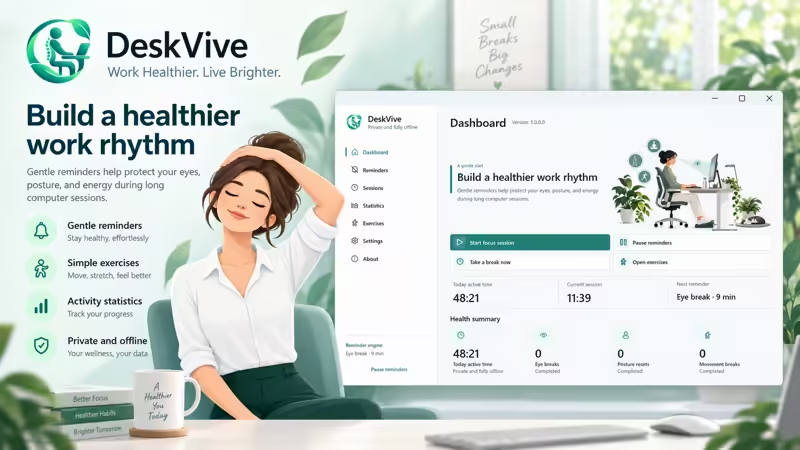
DeskVive, the new Windows wellness application from Devallone, is now available on the Microsoft Store.
Designed for developers, students, designers, office workers, remote workers, and anyone who spends long periods at a computer, DeskVive provides gentle reminders to rest your eyes, reset your posture, stand up, stretch, and move throughout the day.
Rather than interrupting your workflow with complicated routines or intrusive monitoring, DeskVive stays quietly available in the Windows system tray and reminds you when it may be time for a short wellness break.
A healthier rhythm for long computer sessions
When working or studying at a computer for several hours, it is easy to stay focused on the screen and forget to move.
DeskVive is designed around three simple reminder types:
- Eye rest — take a short break from continuous screen focus.
- Posture reset — adjust your sitting position and return to a more comfortable posture.
- Movement break — stand up, stretch, or walk after spending extended time at your desk.
Reminder intervals can be configured from 1 to 240 minutes, allowing users to choose a schedule that fits their own routine.
DeskVive also supports configurable work hours and quiet hours, manual breaks, pausing reminders, and Windows inactivity detection to help avoid unnecessary reminders when you are already away from your computer.
Simple reminder controls
When DeskVive displays a reminder, you can quickly:
- Mark the break as completed
- Snooze it for 5 minutes
- Skip the reminder
- Pause reminders when needed
For eye-rest breaks, an optional 20-second eye-rest overlay can also be displayed to provide a simple moment away from continuous screen focus.
Each reminder uses a clear illustration based on the type of break, making it easy to understand at a glance.
Illustrated desk exercises
DeskVive also includes a collection of simple exercises designed specifically for people who work at a desk.
Available exercises include:
- Eye relaxation — 2 minutes
- Neck stretch — 2 minutes
- Shoulder roll — 1 minute 30 seconds
- Back posture reset — 2 minutes
- Stand and walk — 5 minutes
- Wrist stretch — 1 minute 30 seconds
Each exercise includes an illustration, guidance, and a countdown timer so it can be followed directly inside the application.
DeskVive does not use a camera, automatic posture recognition, motion tracking, or an AI trainer. The exercises are simple illustrated guides that users follow at their own pace.
A dashboard for everyday use
The DeskVive dashboard gives users a quick overview of their current computer session and wellness activity.
It displays:
- Active time today
- Current activity-session duration
- Next scheduled reminder
- Completed eye breaks
- Completed posture resets
- Completed movement breaks
Users can also start a new focus session, pause or resume reminders, immediately take a break, or open the exercise library.
DeskVive remains focused specifically on desktop wellness. It is not a task manager, Pomodoro timer, website blocker, or productivity-monitoring application.
Local wellness statistics
DeskVive keeps useful wellness statistics directly on the user’s computer, including:
- Active time today
- Activity totals for the last 7 days
- Activity totals for the last 30 days
- Seven-day activity chart
- Reminders shown
- Breaks completed
- Reminders snoozed
- Reminders skipped
- Completion percentage
Active time is calculated using Windows idle-input detection and represents detected computer activity. It is not intended to measure productivity, employee performance, or work quality.
Designed naturally for Windows
DeskVive integrates into the Windows desktop experience with features including:
- Windows system-tray integration
- Single-instance behavior
- Optional startup with Windows
- Optional reminder sounds
- Optional completion sounds
- Light mode
- Dark mode
- System appearance mode
- Standard Windows window controls
When DeskVive is already running, opening it again activates the existing application instead of creating duplicate instances.
Private and fully offline
Privacy was an important part of DeskVive’s design.
The application’s core features work offline, and no account is required.
Settings and wellness statistics are stored locally on the user’s Windows computer.
DeskVive does not include:
- Account registration
- Cloud synchronization
- Built-in telemetry
- Transmission of activity history
- Keystroke inspection
- Productivity monitoring
- AI behavior analysis
Internet access is only needed when a user deliberately opens external resources such as the Devallone website or tutorials.
On first launch, DeskVive presents its language selection and privacy policy. Activity tracking and reminders begin only after the user accepts the privacy policy.
Available in 11 languages
DeskVive currently supports:
English, French, Arabic, Spanish, German, Brazilian Portuguese, Italian, Simplified Chinese, Japanese, Hindi, and Russian.
Arabic includes right-to-left interface support while retaining standard Windows caption controls and Western digits.
Built for people who spend their day at a computer
DeskVive can be useful for:
- Developers
- Students
- Designers
- Office employees
- Remote workers
- Freelancers
- Writers
- Researchers
- Anyone regularly spending long periods in front of a Windows PC
The idea behind DeskVive is deliberately simple:
Remember to rest your eyes.
Remember your posture.
Remember to move.
Small breaks can help make long computer sessions more comfortable and easier to manage.
DeskVive by Devallone
DeskVive is a Windows desktop wellness companion from Devallone, focused on gentle reminders, illustrated exercises, local activity statistics, privacy, and offline use.
It brings eye-rest reminders, posture reminders, movement breaks, stretching exercises, and wellness statistics together in one clean Windows application.
DeskVive — Work Healthier. Live Brighter.