
Custom Remote Control Server for Windows
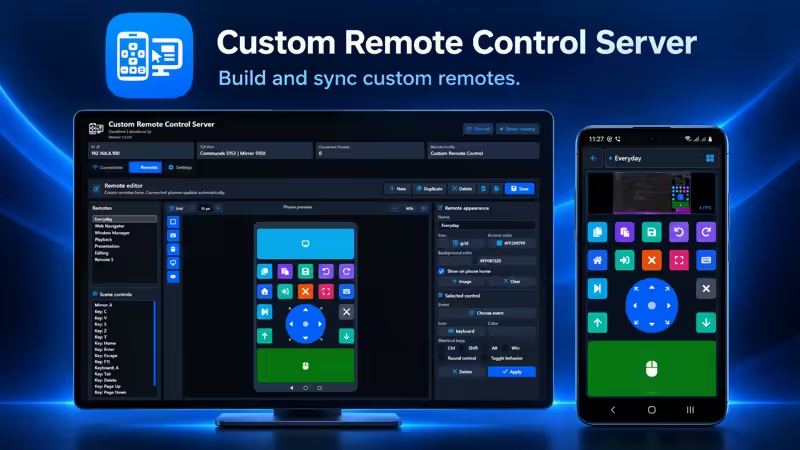
Custom Remote Control Server transforms your Android phone or tablet into a fully personalized remote control for a Windows PC. Instead of being limited to fixed layouts, you can create your own remotes on the computer using a professional visual editor, then synchronize them automatically with the Android app.
Build dedicated controllers for everyday computer use, media playback, presentations, web browsing, creative software, gaming shortcuts, productivity tools and specialized workflows.
Create Remotes Designed for Your Workflow
The integrated Remote Editor gives you complete control over every remote layout. Add controls to the phone preview, move and resize them with the mouse, customize their appearance and assign the exact Windows actions you need.
Each saved remote is automatically delivered to connected Android devices. You can update a layout on the server and use the new version on your phone without rebuilding or reinstalling the mobile app.
Professional Visual Remote Editor
- Create, duplicate, rename and delete remote profiles.
- Design remotes directly inside an accurate phone preview.
- Drag controls from the toolbox and drop them onto the remote.
- Move and resize controls visually with the mouse.
- Use adjustable grid snapping for precise alignment.
- Choose grid steps down to 5 pixels.
- Show or hide the editor grid.
- Zoom the preview in 5% increments.
- Pan the preview while working at larger zoom levels.
- Undo, redo, copy, paste and delete selected controls.
- Keep remote layouts in their original direction across LTR and RTL languages.
Available Remote Controls
Custom Key
Create compact buttons that execute keyboard keys, shortcuts, media commands, mouse clicks or launch actions. Every key can have its own icon, color, size, position and behavior.
Keyboard Control
Add a keyboard control anywhere in the layout. When it is selected on Android, the phone keyboard opens and sends keys or typed text directly to the connected Windows PC.
Mouse Touchpad
Add one or more touchpad areas for controlling the Windows pointer. The mouse control supports pointer movement, left click, right click and two-finger scrolling.
Screen Mirror
Place a live view of the Windows desktop inside any custom remote. Screen mirroring can be combined with mouse, keyboard, joystick and shortcut controls in the same layout.
Joystick
Add a professional four-direction or eight-direction joystick. It can send Windows arrow-key states and supports diagonal movement when eight-direction mode is enabled.
Powerful Actions and Shortcuts
Custom keys can perform a wide range of Windows actions:
- Send individual keyboard keys.
- Create shortcuts with Ctrl, Shift, Alt and the Windows key.
- Type predefined text.
- Send media playback and volume commands.
- Perform left, middle or right mouse clicks.
- Open a website in the default browser.
- Open a Windows file, application or folder.
- Create toggle-style controls for persistent visual states.
Complete Appearance Customization
Every remote can have its own visual identity. Customize the remote name, icon, accent color, background color and optional background image.
Individual controls can also use different colors, icons, dimensions and shapes. Choose from the integrated icon library to create clear layouts that remain easy to recognize on a phone screen.
Automatic Android Synchronization
The Windows server is the central editor and storage location for your custom remotes. Connected Android devices periodically check for updates and automatically download the latest remote catalog.
- Create and edit remotes on a larger Windows screen.
- Press Save to publish the latest layout.
- Update connected phones automatically.
- Receive an Android notification when remotes are updated.
- Keep control positions unchanged regardless of the selected interface language.
Import and Export Remotes
Back up your complete remote collection or transfer it to another computer using the integrated import and export system.
- Export remotes to a
.crc-remotes.jsonfile. - Import compatible remote collections.
- Preserve profiles, controls, positions, colors, icons and actions.
- Share useful remote layouts between your own computers.
Fast Local Network Connection
The server communicates with the Android app through your local Wi-Fi network. No account or cloud connection is required.
- Automatic server discovery on the local network.
- QR-code connection.
- Manual IP-address connection.
- Pairing-token protection.
- Command connection through TCP port
5153. - Screen mirroring through TCP port
5150. - Automatic discovery through UDP port
5152.
Responsive Screen Mirroring
The mirror system is optimized for custom remotes where screen viewing and mouse control are used together. The server sends recent frames without allowing outdated frames to accumulate.
Available mirror settings include:
- 426×240, 640×360 and 854×480 resolutions.
- 5, 10 and 15 FPS frame-rate options.
- Adjustable JPEG quality from 35% to 75%.
- Independent frame delivery for connected devices.
- Automatic dropping of outdated frames.
- Background decoding on Android.
For most networks, 640×360 at 10 FPS and approximately 50% JPEG quality provides a strong balance between visibility and responsive control.
Mouse and Keyboard Settings
- Adjust Windows pointer speed.
- Adjust scrolling speed.
- Invert the scrolling direction.
- Allow or block keyboard commands.
- Allow or block text input.
- Control whether custom input actions may execute.
Desktop and Launch Controls
The server can provide access to Windows desktop items, applications, files and folders. Configure whether the Start menu and hidden items are included and limit the maximum number of displayed entries.
Website, file and folder launching can be disabled independently from the server settings whenever additional restrictions are preferred.
Background Operation
- Start the server automatically with Windows.
- Keep the server running in the notification area.
- Show phone-disconnection notifications.
- Start or stop the server from the main interface.
- View the active IP address and connected-phone count.
- Monitor server activity and the currently active remote profile.
Multilingual Interface
Custom Remote Control Server includes support for multiple interface languages, including English, Arabic, German, Spanish, French, Hindi, Portuguese, Russian and Chinese.
The editor interface follows the selected language direction, while the designed remote itself keeps its original control positions and dimensions.
Privacy and Security
- Communication takes place over the local network.
- No user account is required.
- No cloud remote-storage service is required.
- Pairing information helps prevent unintended connections.
- Keyboard, text, website and file actions can be restricted.
- Remote collections remain under the user’s control.
System Requirements
- Windows 10 or Windows 11.
- An Android phone or tablet with Custom Remote Control for PC installed.
- Both devices connected to the same local network.
- Windows Firewall permission on private networks.
All Remote Features Included
Custom Remote Control Server is designed as a complete remote-building platform. The editor, mouse, keyboard, mirror, joystick, synchronization, import and export features are included without requiring separate remote add-ons.
Download and Learn More
- Windows server: Get it from Microsoft Store
- Server page and tutorial: Custom Remote Control Server
- Android remote: Get it from Google Play
- Android page and tutorial: Custom Remote Control for PC
- Privacy policy: View the privacy policy
Create the controls you need, arrange them your way and manage your Windows PC from a personalized Android remote.