
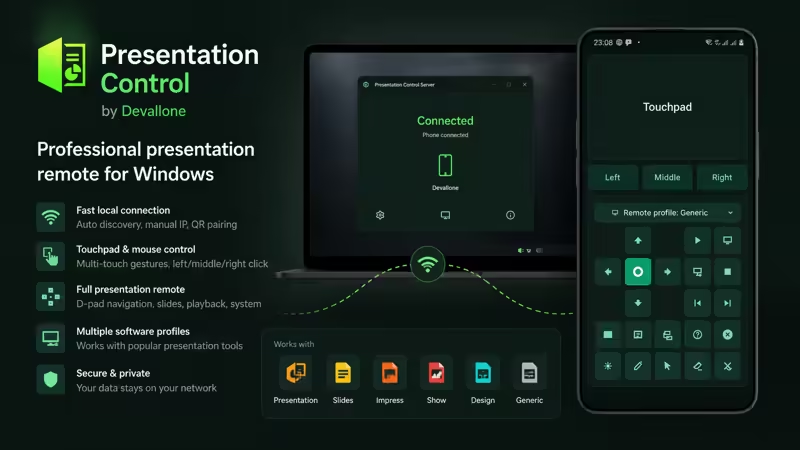
Presentation Control turns your Android phone into a professional wireless presentation remote for your Windows PC.
Designed for teachers, students, trainers, business professionals, meeting hosts, conference speakers, and office users, Presentation Control helps you control slides, presentations, and mouse actions from anywhere in the room.
Connect your Android phone to Presentation Control Server on your Windows PC over the same local Wi-Fi/LAN network. Once connected, your phone becomes a clean presentation remote with slide navigation, touchpad control, mouse buttons, and presentation-focused shortcuts.
Presentation Control is built for real presentation workflows, whether you are presenting in a classroom, meeting room, office, training session, lecture hall, or conference environment.
Main features:
• Wireless Android-to-Windows presentation control
• Local Wi-Fi/LAN connection
• Automatic server discovery
• QR code pairing
• Manual IP connection
• Slide navigation controls
• D-pad controls
• Playback controls
• Presentation shortcuts
• Built-in touchpad and mouse remote
• Left, middle, and right mouse buttons
• Multi-touch gesture support
• Multiple presentation profiles
• Clean fixed control layout
• No cloud account required
• Privacy-focused local network communication
Touchpad gestures:
• One-finger movement for cursor control
• Double tap and hold for drag operations
• Two-finger tap for right click
• Two-finger drag for scrolling
• Three-finger tap for middle click
Presentation Control includes optimized profile concepts for popular presentation workflows, including:
• PowerPoint
• Google Slides
• LibreOffice Impress
• WPS Presentation
• Canva
• Generic Presentation Mode
These names are compatibility examples only. Presentation Control is not affiliated with or endorsed by Microsoft PowerPoint, Google Slides, LibreOffice, WPS Office, Canva, or their respective owners.
The Windows companion app, Presentation Control Server, handles connection management, QR pairing, server discovery, status monitoring, connection notifications, system tray support, and background operation.
Presentation Control is useful for:
• Teachers and educators
• Students
• Business presentations
• Meeting hosts
• Trainers and coaches
• Conference speakers
• Office users
• Classroom control
• Lecture halls
• Presentation rooms
• TV-connected Windows PCs
How it works:
- Install Presentation Control on your Android phone.
- Install and run Presentation Control Server on your Windows PC.
- Connect using automatic discovery, QR code pairing, or manual IP.
- Start controlling your slides and mouse from your phone.
Important:
• Requires Presentation Control Server on a Windows PC
• Phone and PC must be connected to the same local Wi-Fi/LAN network
• Windows Firewall permission may be required for the server
• Compatibility depends on the presentation software, browser, focused window, and selected profile
• This app is designed for presentation and mouse control, not full remote desktop streaming
Presentation Control gives you a clean and practical way to present confidently, move freely, and stay focused on your audience.
Presentation Control — your Android phone, your Windows presentation remote.