Remote AIO – PC Mouse Keyboard turns your Android phone or tablet into a complete Windows PC remote control center.
Use your phone as a wireless mouse, smooth touchpad, full keyboard, PC screen viewer, media remote, presentation controller, shortcut pad, file browser, audio mixer, desktop launcher, and more.
Remote AIO is built for users who want one clean Android app to control their Windows PC over a local Wi-Fi / LAN network.
SERVER DVL REQUIRED ON WINDOWS
Remote AIO requires the Windows companion app Server DVL.
Install Server DVL on your Windows PC, open it, then connect Remote AIO from your Android phone.
Server DVL Microsoft Store:
https://apps.microsoft.com/detail/9N0MRFW92TZ4
FAST CONNECTION METHODS
Remote AIO connects to Server DVL over your local network.
You can connect using:
• Auto discovery on the same Wi-Fi network
• QR code scanning from Server DVL
• Manual IP connection using the PC IP address
For best results, make sure your phone and PC are connected to the same Wi-Fi or LAN network.
MOUSE & TOUCHPAD
Control your Windows PC from your phone with:
• Smooth cursor movement
• Left click, right click, and middle click
• Scroll controls
• Adjustable sensitivity
• Portrait and landscape touchpad options
KEYBOARD FOR WINDOWS
Use your Android phone as a full keyboard for your PC.
Keyboard features include:
• Full keyboard layout
• F1-F12 keys
• Special keys
• Ctrl, Alt, Shift, and Win keys
• Shortcut support
• Useful for TV PCs, media PCs, browsers, search, work, and quick typing
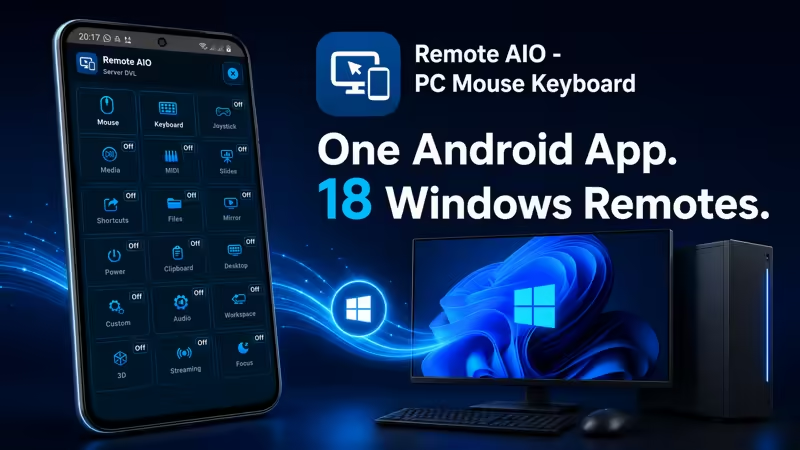
18 WINDOWS REMOTES IN ONE APP
Remote AIO includes 18 remotes for different Windows workflows:
• Mouse – touchpad, clicks, scroll, and sensitivity
• Keyboard – full keyboard and special keys
• Joystick – game-style controls and profiles
• Media – play, pause, volume, mute, previous, and next
• MIDI Piano – play notes, sustain, and send MIDI input
• Slides – control presentations from your phone
• Shortcuts – quick commands and shortcut profiles
• Files – browse and open files from the shared folder
• PC Mirror – view your PC screen on your phone
• Power – lock, sleep, restart, sign out, and shut down
• Clipboard/Text – send text, copy, and paste between phone and PC
• Desktop – launch apps, files, folders, and switch windows
• Custom – build your own remote with buttons, colors, and keys
• Audio Mixer – control output volume, microphone, and audio devices
• Workspace Layout – snap windows, task view, and virtual desktops
• 3D Creator Control – profiles for Blender, Unity, Maya, Godot, ZBrush, Cinema 4D, and Unreal
• Streaming Studio – control recording, streaming, scenes, and studio actions when configured
• Focus Session – focus timer, break timer, pause, finish, and productivity actions
PC MIRROR
View your Windows desktop on your Android phone.
PC Mirror is useful for checking your PC screen from another place in the room, monitoring activity, viewing a media PC, or using your phone as a secondary viewing screen.
Quality, FPS, and resolution can be adjusted from Server DVL to balance clarity and performance.
FILES, DESKTOP & CLIPBOARD
Remote AIO can help you:
• Open files and folders from the configured shared folder
• Launch apps and desktop items
• Browse supported desktop content
• Send text from your phone to your PC
• Paste text on Windows
• Get text from the PC clipboard when supported
MEDIA, SLIDES, STREAMING & CREATIVE WORK
Remote AIO is useful for:
• Watching movies and controlling playback
• Managing music from a distance
• Controlling presentations
• Using shortcuts for productivity
• Playing simple MIDI notes
• Managing audio devices
• Working with 3D software profiles
• Controlling streaming or recording actions when configured
• Running focus sessions for productivity
FREE AND PRO
Mouse and Keyboard are included.
Advanced remotes are unlocked with one Server DVL Pro upgrade called “Unlock all remotes”.
One upgrade unlocks all Pro remotes on the Windows server. Pro is not purchased separately per remote.
PRIVACY-FRIENDLY LOCAL CONTROL
Remote AIO is designed for local Windows PC control.
• No account is required for normal local remote control
• Commands are sent through your local Wi-Fi / LAN network
• Camera permission is used for QR code scanning
• File access is based on the shared folder selected in Server DVL
• No cloud relay is required for local control
REQUIREMENTS
• Android phone or tablet
• Windows PC with Server DVL installed
• Phone and PC connected to the same local Wi-Fi or LAN
• Windows Firewall may need to allow Server DVL on private networks
• Some actions depend on Windows permissions, active app focus, system settings, or configured server options
GET STARTED
- Install Server DVL on your Windows PC.
- Open Server DVL.
- Open Remote AIO on Android.
- Connect using Auto, QR, or Manual IP.
- Control your PC from your phone.
Remote AIO = Android remote control app
Server DVL = Windows companion server
One Android app. 18 Windows remotes.