
DeskVive – Healthy reminders for long computer sessions
DeskVive is a private, offline Windows wellness app designed for people who spend long hours at a computer.
Whether you are a developer, student, designer, office worker, remote worker, or simply use your PC for extended periods, DeskVive helps you build a more comfortable work rhythm with gentle reminders to rest your eyes, adjust your posture, stand up, move, and take short wellness breaks.
Instead of distracting you from your work, DeskVive quietly stays available in the Windows system tray and reminds you when it may be time for a short break.
Your settings and activity history are stored locally on your computer. No account is required, and the core features of DeskVive work offline.
A healthier rhythm for your time at the computer
Long computer sessions can make it easy to forget about eye breaks, posture changes, stretching, and movement.
DeskVive provides simple reminders throughout your day so you can develop better desk habits without complicated routines.
Configure reminders for:
• Eye rest – Step away from continuous screen focus and give your eyes a short break.
• Posture reset – Take a moment to adjust your sitting position and return to a comfortable posture.
• Movement breaks – Stand up, stretch, or walk after extended periods at your desk.
Automatic reminder intervals can be configured from 1 to 240 minutes, giving you control over how often DeskVive reminds you.
You can also define work hours and quiet hours, pause reminders whenever necessary, or request a break manually at any time.
DeskVive considers detected Windows inactivity before showing automatic reminders, helping prevent unnecessary interruptions when you are already away from the computer.
Simple reminder controls
When a reminder appears, you can quickly:
• Mark the break as completed
• Snooze it for 5 minutes
• Skip it
• Pause reminders when you do not want to be interrupted
For eye-rest breaks, DeskVive can also display an optional 20-second eye-rest overlay, giving you a simple moment to look away from the screen.
Reminder illustrations change according to the type of break, making each reminder easy to understand at a glance.
Illustrated wellness exercises
DeskVive includes a collection of simple exercises created specifically for people who spend time working at a desk.
Available exercises include:
• Eye relaxation – 2 minutes
• Neck stretch – 2 minutes
• Shoulder roll – 1 minute 30 seconds
• Back posture reset – 2 minutes
• Stand and walk – 5 minutes
• Wrist stretch – 1 minute 30 seconds
Each exercise includes its own illustration, clear guidance, and countdown so you can follow it directly from the application.
There is no camera monitoring, motion tracking, automatic posture recognition, or AI trainer. DeskVive simply provides clear illustrated guidance that you can follow at your own pace.
Dashboard designed for everyday use
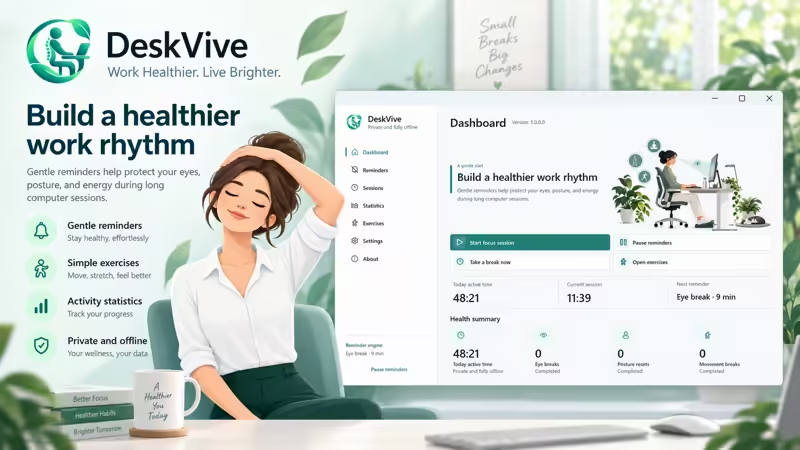
The DeskVive dashboard gives you a quick overview of your current work session and wellness activity.
You can see:
• Active time today
• Current activity-session duration
• Your next reminder
• Completed eye breaks
• Completed posture resets
• Completed movement breaks
You can also start a new focus session, pause or resume reminders, take a break immediately, or open the exercise library.
Starting a focus session resets the current activity-session counter and resumes reminders, giving you a clean starting point when beginning a new period of computer work.
DeskVive is focused on wellness reminders and comfortable computer habits. It is not a task manager, website blocker, distraction blocker, or Pomodoro productivity system.
Activity and break statistics
DeskVive lets you review your wellness activity directly on your computer.
Statistics include:
• Active time for today
• Activity totals for the last 7 days
• Activity totals for the last 30 days
• Seven-day activity chart
• Reminders shown
• Breaks completed
• Reminders snoozed
• Reminders skipped
• Completion percentage
Statistics can also be reset locally with confirmation.
Active time is calculated using Windows idle-input detection. It represents detected computer activity and is not a measurement of productivity, performance, or work quality.
Made for Windows desktop
DeskVive integrates naturally into your Windows workflow.
The application includes system-tray support, allowing DeskVive to remain available even when the main window is minimized or closed.
Other desktop features include:
• Windows system-tray integration
• Single-instance behavior
• Optional startup with Windows
• Optional reminder sounds
• Optional completion sounds
• Light appearance
• Dark appearance
• System appearance mode
• Standard Windows window controls
Opening DeskVive again while it is already running activates the existing application instance instead of creating unnecessary duplicate windows.
Private and offline by design
DeskVive is designed for users who want a simple desktop wellness tool without accounts, cloud services, or activity-data transmission.
Core DeskVive features work offline.
Your application settings and wellness statistics are stored locally in your Windows application-data folder.
DeskVive does not include:
• Account registration
• Cloud synchronization
• Built-in telemetry
• Transmission of your activity history
• Keystroke inspection
• Productivity monitoring
• AI behavior analysis
Website and tutorial links only open in your browser when you choose them and require an internet connection at that time.
On first launch, DeskVive presents language selection and its privacy policy. Activity tracking and reminders do not begin until you explicitly accept the privacy policy.
Available in multiple languages
DeskVive supports interfaces in:
English, French, Arabic, Spanish, German, Brazilian Portuguese, Italian, Simplified Chinese, Japanese, Hindi, and Russian.
Arabic includes right-to-left interface support while keeping standard Windows caption controls and Western digits.
Designed for people who work at a desk
DeskVive can be useful for:
Developers working through long coding sessions, students studying on a computer, designers working on creative projects, office employees, remote workers, freelancers, writers, researchers, and anyone who regularly spends extended periods in front of a Windows PC.
Instead of complicated health dashboards or intrusive monitoring, DeskVive focuses on something simple:
Remember to rest your eyes.
Remember your posture.
Remember to move.
Small breaks can make long computer sessions feel more manageable and comfortable.
DeskVive by Devallone
DeskVive is a Windows desktop wellness companion by Devallone focused on gentle reminders, simple illustrated exercises, local statistics, privacy, and offline use.
Build a more comfortable computer routine with eye-rest reminders, posture reminders, movement breaks, stretching exercises, and local activity statistics — all from a clean Windows desktop application.
DeskVive — a private and fully offline companion for a healthier work rhythm.