
PC Mirror Control lets you view your Windows PC screen directly on your Android phone or tablet over the same local Wi-Fi / LAN network.
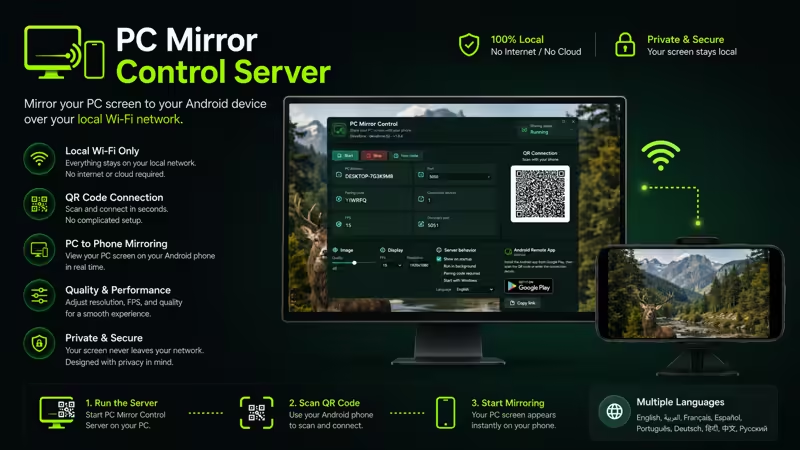
Install PC Mirror Control on Android, install PC Mirror Control Server on your Windows PC, connect using QR code or manual connection details, and start viewing your live PC screen on your phone.
PC Mirror Control is built for simple local screen mirroring. No cloud account. No complicated setup. No unnecessary remote-control features. Just a clean and practical way to mirror your Windows screen to Android.
KEY FEATURES
Live Windows Screen Viewing
View your Windows PC screen on your Android device through your local network.
Local Wi-Fi / LAN Connection
Your Android device and Windows PC connect over the same local Wi-Fi or LAN network.
QR Code Pairing
Scan the QR code shown in PC Mirror Control Server to connect quickly.
Manual Connection
Connect manually using the PC IP address, port, and pairing code shown by the Windows server.
Automatic Server Discovery
Find your PC server on the same local network when discovery is available.
Fullscreen Viewing Mode
Use fullscreen mode for a cleaner screen viewing experience.
Portrait and Landscape Support
View your PC screen in portrait or landscape orientation depending on your device and workflow.
Multiple Screen Fit Modes
Choose how the PC screen is displayed on your Android device.
Clean Dark Interface
Designed with a modern dark interface for a simple and focused viewing experience.
Privacy-Friendly Local Operation
Your screen stream stays on your local network. PC Mirror Control does not require a cloud account for screen transmission.
No Account Required
Use the app without creating an account or signing in.
HOW IT WORKS
- Install and run PC Mirror Control Server on your Windows PC.
- Open PC Mirror Control on your Android phone or tablet.
- Make sure both devices are connected to the same Wi-Fi or LAN.
- Connect using QR code, automatic discovery, or manual details.
- View your Windows PC screen on your Android device.
WINDOWS SERVER REQUIRED
PC Mirror Control requires the Windows companion app:
PC Mirror Control Server
Microsoft Store: https://apps.microsoft.com/detail/9PM0N62VVZLX
The server runs on your Windows PC, captures the screen locally, and streams it to the Android app through your local network.
PERFECT FOR
• Monitoring your PC from another room
• Following presentations from your phone
• Watching tutorials while away from your desk
• Demonstrations and training sessions
• Viewing desktop activity inside your home or office network
• Using your phone as a convenient secondary viewing screen
• Productivity and multi-screen workflows
• Educational and classroom environments
IMPORTANT
PC Mirror Control is focused on screen viewing and mirroring only.
It does not provide remote desktop control, keyboard input, mouse control, file transfer, or cloud streaming features.
REQUIREMENTS
• Android phone or tablet
• Windows PC with PC Mirror Control Server installed
• Phone and PC connected to the same local Wi-Fi or LAN
• Network permissions may be required depending on your Windows firewall and local network settings
PRIVACY NOTE
PC Mirror Control works through your local Wi-Fi / LAN network. Your screen stream remains inside your local network and does not require cloud-based screen transmission.
PC Mirror Control = Android screen viewing app
PC Mirror Control Server = Windows PC companion server
Mirror your Windows PC screen to your Android device with a simple, focused, and privacy-friendly local viewing experience.