
Joystick Control turns your Android phone into a wireless virtual game controller for your Windows PC.
Designed for gamers who want a clean, responsive, and modern control experience, Joystick Control lets you connect your phone to your PC over the same local Wi-Fi/LAN network and control supported games using a fullscreen virtual gamepad.
To use the app, install and run Joystick Control Server on your Windows PC, then connect the Android app using automatic discovery, QR code pairing, or manual IP connection. Once connected, your phone becomes a landscape game controller ready for gameplay.
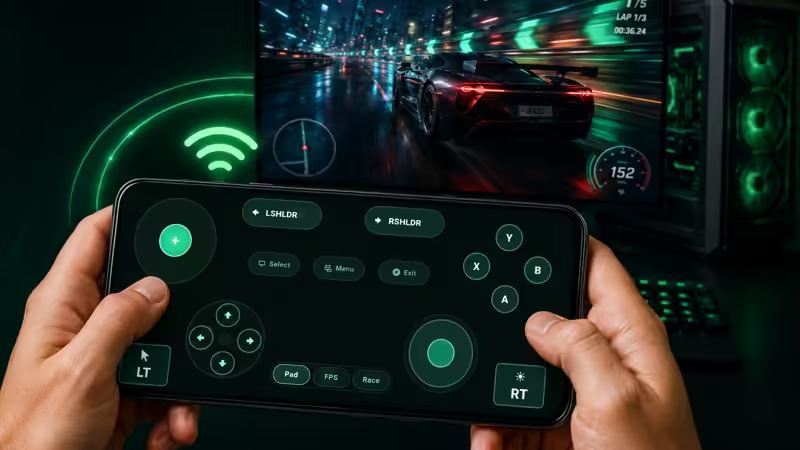
Joystick Control includes a full controller-style layout with:
• Left joystick for movement
• Right joystick for look or mouse control
• D-pad controls
• A, B, X, Y action buttons
• LT and RT trigger buttons
• Left and right shoulder buttons
• Select, Menu, and Exit buttons
• Pad, FPS, and Race control modes
The Windows server receives commands from your phone and converts them into keyboard and mouse input on your PC. This makes Joystick Control useful for different game types, including racing games, shooters, platformers, sandbox games, and custom control setups.
Joystick Control is built for fast setup and everyday use. You can connect through automatic local discovery, scan a QR code from the Windows server, or enter the server IP address manually when needed.
Main features:
• Wireless Android-to-Windows controller system
• Local Wi-Fi/LAN connection
• Automatic PC discovery
• QR code pairing
• Manual IP connection
• Fullscreen landscape controller
• Virtual joystick, D-pad, buttons, triggers, and shoulder controls
• Pad, FPS, and Race modes
• Responsive button feedback
• Vibration / haptic feedback
• Works with Joystick Control Server for Windows
• No account required
• Privacy-friendly local network design
Joystick Control Server also supports profiles and custom mapping on Windows, allowing phone controls to be mapped to keyboard and mouse actions. You can use built-in profile concepts or customize controls for your own gameplay style.
Important:
Joystick Control requires Joystick Control Server on a Windows PC.
Your Android phone and Windows PC should be connected to the same local network for best results.
Game compatibility can vary depending on the game, input settings, permissions, or anti-cheat behavior.
Joystick Control gives you a practical and modern way to use your Android phone as a wireless controller for your Windows PC.
Joystick Control — your Android phone, your Windows PC, your game controller.